Tuesday, November 29

CoffeeShop Winter Wonderland Digital Paper Pack!


I wanted to post at least one more set of winter papers for those of you who like to use these in your Christmas and holiday cards.  These papers are high resolution and can be used in cards, storyboards, scrap-booking, blog design, etc.  I hope you enjoy them!

Today I had two sick little boys, so while they were watching Mighty Machines I had some fun creating the popular bunting flags you see everywhere.  I will post those next post.  They are really cute, customizable, and I think you will like them.

Download the free CoffeeShop Winter Wonderland Digital Paper Set!  If that link does not work, you can also download them at MediaFire.

Pin It
Want all of my favorite CoffeeShop Actions or Design Elements in one simple download AND help support this blog? Just click here for my action pack or here for a download of some of my most popular design elements, storyboards, and textures (including these papers!).

Thursday, November 24

Best Thanksgiving!!!!

I don't have time to post any pics right now, but I had the best Thanksgiving with our family today. The food and company were perfect, and we were able to celebrate outside because the weather was simply beautiful. I hope all of you had a wonderful day too.

I noticed that PSE is still on sale, so please go check it out if you are ready to upgrade.


I have tons of freebies I need to post on my blog this month, so please keep on visiting. :-)


Want all of my favorite CoffeeShop Actions or Design Elements in one simple download AND help support this blog? Just click here for my action pack or here for a download of some of my most popular design elements, storyboards, and textures.

Wednesday, November 23

Happy Thanksgiving!!!


Just finished up my famous mashed potatoes smothered in butter while rocking out to Scorpion's Lovedrive on the amazing free Spotify.  See, the kids are at Grandma's so mama can listen to her adult music.  And one of my favorite rock songs in the world has to be Holiday (it really starts rocking out around 3:00).  I heard it the first time on my Sony Walkman tape player back in the 80's.  I met this sweet boy from the Netherlands on our family trip to Sanibel Island, FL and he passed me this mixed tape to listen to on the beach.  Funny how certain songs bring back such strong memories.  Ahhhh, mixed tapes...

I had never heard the Scorpions and I was blown away.   Those were such simple times.   BTW, that boy (now a man in his 40's) is back in Europe with a great job, married to a beautiful wife, has an adorable little boy and plays in a rock band part-time.  Thank you Facebook.  ;-)

I  love all types of music and we listen to classic and jazz usually during the day, but when I am alone at home or in my car I love me some 70's and 80's blues and rock.  Scorpions, Rush, Stevie Ray, Queen, Pink Floyd, Hendrix, Metallica, Van Halen, Boston, Led Zeppelin, Doors, and even some of those hair bands.  And did I mention my husband can play a mean electric guitar?

Now my free adult music time draws to a near and I have to finish getting the house ready for company tomorrow.   I think Mom might notice if I don't pick up the kids...

I hope all of you have a wonderful Thanksgiving!

Want all of my favorite CoffeeShop Actions or Design Elements in one simple download AND help support this blog? Just click here for my action pack or here for a download of some of my most popular design elements, storyboards, and textures. 

Tuesday, November 22

CoffeeShop Facebook Profile Templates!


I don't know what is going on, but I am really inspired to create on the computer lately.  Right now the kids are watching some Mighty Machines videos and I am playing on the computer.  It is a rainy day and they have the week off from homeschool, so I decided to throw together a few projects for my blog before Thanksgiving and the out-of-town family arrive.

I have had so many people request Facebook profile templates, so I made three for today's post.  I just replaced my own profile picture using one of them.  They are 180 x 500px layered .psd files with clipping masks.  You can add your images using my Group It action and the background color is totally adjustable.  I also have a few clipping masks tutorials.

My images are highlighted in blue in the screenshot below.  Just group your images above their clipping masks and Ctrl-T them to fit.  You can also change the color of the background texture by clicking on Background Texture Color.  If you want a solid color background just turn off the texture layer and then set the Background Texture Color layer to Normal blending mode.

You can also change the color of the label by turning on the label color layer and clicking it to adjust.

Add your text and logo to the label and you are good to go!  I hope you enjoy playing with these.  And if I don't get on the computer before then, Happy Thanksgiving to everyone!!!!


Do you want to download my favorite CoffeeShop PSE/Photoshop Actions and Lightroom Presets or Design Elements in one convenient zipped file AND help support this blog? Just click here for my action pack or here for a download of some of my most popular design elements, storyboards, and textures.

For complete info on installing all of my actions, click here.

Monday, November 21

CoffeeShop SleighBells Digital Paper Set!


I had so much fun  making my last set of digital paper I decided to put together a few more sets.  This set is called SleighBells and is perfect for your winter holiday/Christmas designs but also can be used year-round since they are not specially holiday-themed.  These are high resolution and can be used on cards, storyboards, blog/website designs, etc.

Download the totally free CoffeeShop SleighBells Digital Paper Set!  If that link does not work, you can download it on MediaFire.

Want my favorite CoffeeShop Actions or Design Elements in one simple download AND help support this blog? Just click here for my action pack or here for a download of some of my most popular design elements, storyboards, and textures. 

Sunday, November 20

CoffeeShop Golden Afternoon PS/PSE Action!


All in the golden afternoon
Full leisurely we glide;
For both our oars, with little skill,
By little arms are plied,
While little hands make vain pretence
Our wanderings to guide.

Alice in Wonderland, Lewis Carroll

I love editing with golden tones (it cheers me up on gloomy Autumn days) so I wrote a new action, CoffeeShop Golden Afternoon (thanks Heather for the name suggestion!). After this action runs you will only have two layers, your original image and the Golden Afternoon layer. You can adjust the opacity of the Golden Afternoon layer or use a black soft brush on the layer mask to remove it selectively.

Now I have to go clean house since I am hosting the family Thanksgiving this year.  Wish me luck!!!


Download the free CoffeeShop Golden Afternoon Photoshop/Photoshop Elements action! 
 
Do you want to download all of my favorite professional CoffeeShop PSE/Photoshop actions (including exclusive ones not found anywhere for free), textures, papers, clip art/design elements, storyboards, and Lightroom presets in one convenient zipped file AND help support this blog? Just click here for my CoffeeShop Mega Download Pack!

Friday, November 18

{Friday Photo Bliss}

Inspired by the SouleMama blog's {this moment}, I am posting one image every Friday, taken that week, that really makes me happy. If you end up doing the same I would love to see your photo linked in my comments!


Want all of my favorite CoffeeShop Actions or Design Elements in one simple download AND help support this blog? Just click here for my action pack or here for a download of some of my most popular design elements, storyboards, and textures. 

Thursday, November 17

Christmas Holiday Papers!


I love putting together digital papers and I wanted to make some that can be used for the holidays.  These papers are high resolution and can be used on storyboards, cards, blog designs, etc.  I hope you enjoy them!

Download the free Christmas Holiday Digital Paper Set.  If this link does not work, you can download them on MediaFire.

Want all of my favorite CoffeeShop Actions or Design Elements in one simple download AND help support this blog? Just click here for my action pack or here for a download of some of my most popular design elements, storyboards, and textures. 

Wednesday, November 16

CoffeeShop WebBoards 4!


ColorInc. has a holiday greeting card sale today, good through tomorrow.  Please check them out!  It is not too soon to get those Christmas cards printed.  I can't believe how fast time flies...

Continuing my WebBoard Series, I wanted to post a new storyboard for you today.  I love web storyboards and I can't stop making them. They are such a perfect way to present your images.  You can also use these storyboards on greeting cards or blog design.

This storyboard has clipping masks (easily add images using my Group-It action!) and you can easily change the background or frame color by clicking on their layers.  The drop-shadow effect is optional and can be turned off.  Why not add some a pretty texture or digital paper as the background, just drop it on the storyboard, Ctrl-T it to fit, and then drag it just over the background color layer.


This is an image file, not an action, so open it like any other photo.  Download the totally free CofffeeShop WebBoards 4 storyboard!  If that link does not work, then you can also download it here.

Do you want to download my favorite CoffeeShop PSE/Photoshop Actions and Lightroom Presets or Design Elements in one convenient zipped file AND help support this blog? Just click here for my action pack or here for a download of some of my most popular design elements, storyboards, and textures.

For complete info on installing all of my actions, click here.

Tuesday, November 15

Fun with Texture Recipes Featuring FlyPaper Textures!


I love using textures because you can turn an otherwise boring snapshot into a piece of art.  If you haven't checked out  FlyPaper textures yet (coupon code included at the end of this post), you are really missing out.

I have been a fan of Paul Grand of Flypaper since I first saw his work on Flickr.  I have even used his free textures in some of my tutorials.  Then Paul joined up with Jill and they started FlyPaper Textures, where they sell gorgeous textures and share the recipes they use to edit their images.

I read their blog as often as possible just for the inspiration.  Today I was visiting their blog and wanted to see what would happen if I took a boring ocean photo and followed this texture recipe exactly.  Yes, I am a nerd... Luckily I am a proud owner of the Spring Painterly textures (they sent them to me a while back because they know I am a texture addict).

I  included a screenshot of my layers below, and I didn't cheat at all.  I even used the same layer opacities and masking and the entire edit took less than 10 minutes.  I love how Paul and Jill combine different combinations of textures and use masking and hue saturation layers.  Every layer is important.  And I am really pleased with my final edit.  I think I have an excuse to go back to the beach next month and take some new photos.

I wrote Jill and Paul to give them a  heads up that I was posting a before/after of my image using their textures (hopefully my after won't hurt their eyes too much) and Jill generously sent a coupon code just for my readers!  Enter the code Coffee on purchase and you will receive a 15% discount off any of their texture packs.  This is good until Dec. 15th. Thank you so much Jill and Paul!

Obviously you aren't going to use an exact recipe when you edit your own image, but it can make a wonderful starting off point.


Want all of my favorite CoffeeShop Actions or Design Elements in one simple download AND help support this blog? Just click here for my action pack or here for a download of some of my most popular design elements, storyboards, and textures.

Sunday, November 13

October Beach Fun


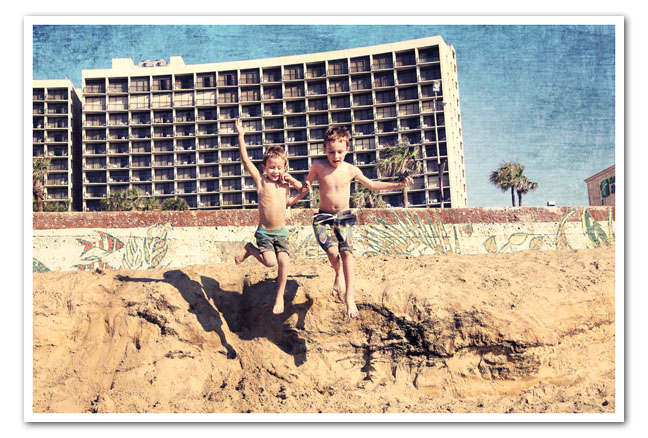
I was  flipping through my unedited images in Lightroom 3 and I found this great action shot of the boys down in Galveston. A few weeks ago we decided to run down there for a few days before it started getting cool, and we had a wonderful time. It was warm and sunny and perfect. I decided to post this photo just because it makes me happy (I am smiling right now as I type).

I used my new action Golden Afternoon and a texture from the Chasing Dreams Mishmosh set (Elegance). I love how the texture really enhanced the otherwise boring blue sky. Golden Afternoon is similar to my favorite action, Butterscotch Vintage, but has a slightly different tint and a bit more contrast. I think you will really enjoy using it and I think it is stunning on beach scenes such as the one below.


I just calibrated my iMac with my Spyder 3 Pro and I am really happy how it turned out. I had used it on my PC/Dell combo, but I was scared to try it on my new computer. But it worked! I also pulled out my husband's old PC laptop and calibrated it and the screen doesn't blind me anymore. It is such an easy calibrator and I am so happy I can use it on my Mac.

So now my screen is calibrated and it is time to get some photos printed at ColorInc! I have so many great shots of the boys and it is crazy they are  just sitting there in LightRoom...

Hope you are enjoying the last of the weekend!

Want all of my favorite CoffeeShop Actions or Design Elements in one simple download AND help support this blog? Just click here for my action pack or here for a download of some of my most popular design elements, storyboards, and textures. 

Saturday, November 12

CoffeeShop Boost It Action!


You can probably tell I have been doing some housecleaning on my blog.  I am a one-woman show here at CoffeeShop;  I create all of my freebies, maintain my own blog, and personally answer all emails and Facebook questions.  In other words I am sometimes overwhelmed and stressed out.  ;-)  But spending time with my family keeps me sane, most of the time.  That and coffee...

Hopefully my updated Action Install instructions will be helpful, and my menubar is much easier to navigate.  If you find broken links or have any suggests about making this blog easier on the eyes and brain, please leave a comment.

I also am so thankful for every reader, sponsor, donation, and purchase of my action/digital download pack.  Every one of you makes it possible for me to stay at home and have fun creating things for this blog.  Because it is fun, I get to play at the computer and make things!  But best of all, from day one I wanted CoffeeShop to be a completely free resource for photographers, and because of you this is possible.

Talking about busy moms, my dear friend Amanda of EveryDay Elements is having a birthday and also a wonderful giveaway!  Please drop in and enter.  While you are visiting be sure to check out her actions and workshops!

I am finally posting the CoffeeShop Boost It action which I mentioned in the Vanilla Latte Action UnWrapped post.  This is a simple action that gives subtle contrast boost (and can be lovely on skin).  Photoshop users can easily do this by hand, but PSE users have to use the action to get the same effect. I love unlocking the potential of PSE.

I have several more actions, storyboards, and design elements coming out in the next weeks.  I took a small break last month and now I am back with new inspiration!

Download the free CoffeeShop Boost It action! You can also download it here.

Want all of my favorite CoffeeShop Actions or Design Elements in one simple download AND help support this blog? Just click here for my action pack or here for a download of some of my most popular design elements, storyboards, and textures. For complete info on installing all of my actions, click here.

Friday, November 11

{Friday Photo Bliss}

Inspired by the SouleMama blog's {this moment}, I am posting one image every Friday, taken that week, that really makes me happy. If you end up doing the same I would love to see your photo linked in my comments!


Affordable Texas childcare: The Kid Cage at the Texas Renaissance Festival. For $3/child they will put your children in this multi-level cage and you can sit there watching them have the time of their life while enjoying the company of your husband and a beer/wine/coffee/tea/ice cream.

I think the boys played in there for over 30 minutes. Best money ever spent.

Want all of my favorite CoffeeShop Actions or Design Elements in one simple download AND help support this blog? Just click here for my action pack or here for a download of some of my most popular design elements, storyboards, and textures.

Wednesday, November 9

CoffeeShop Sweater Weather Vintage Paper Set!


We have had a few cool snaps (I know, some of you are getting snowed in already), and I was inspired to make some vintage autumn/winter colored papers.  I used some textured papers from
Lori Peterson and a damask pattern from Pixels & IceCream.  These can be used in any type of digital design like cards, blog backgrounds, storyboards, or even as textures.

These files are not actions but simple jpg image files, so open them like any other picture in your photo-editing program! And like all of my freebies, you can use these personally or commercially, just don't repackage and sell them "as is".

Download the free CoffeeShop Sweater Weather Vintage Paper set!  If that link does not work, you can download the digital papers from MediaFire.

Want all of my favorite CoffeeShop Actions or Design Elements in one simple download AND help support this blog? Just click here for my action pack or here for a download of some of my most popular design elements, storyboards, and textures (including this Sweater Weather paper set!). 

Saturday, November 5

CoffeeShop Ric-Rac!


I love Ric-Rac and I needed a digital version for some cards I was designing.  I found some tutorials on making it in Photoshop, but I was lazy and decided to use my new scanner and scanned in a piece I had lying around.  I later found it knotted around a toy penguin...

They are high resolution transparent png files so you can drag and drop them on any photo or design.  Ric-Rac looks great on blog headers and background, cards, storyboards, etc.  I hope you enjoy playing with them!  I will have some other types of ribbons, some new vintage papers, and a new action coming out soon.

Download the free CoffeeShop Ric-Rac set!  If that download does not work, you can also download it on MediaFire.

Do you want to download my favorite CoffeeShop PSE/Photoshop Actions and Lightroom Presets or Design Elements in one convenient zipped file AND help support this blog?  Just click here for my action pack or  here for a download of some of my most popular design elements, storyboards, and textures.   


For complete info on installing all of my actions, click here.

Friday, November 4

{Friday Photo Bliss}

Inspired by the SouleMama blog's {this moment}, I am posting one image every Friday, taken that week, that really makes me happy. If you end up doing the same I would love to see your photo linked in my comments!


Want all of my favorite CoffeeShop Actions or Design Elements in one simple download AND help support this blog? Just click here for my action pack or here for a download of some of my most popular design elements, storyboards, and textures.

Thursday, November 3

CoffeeShop Vanilla Latte B&W Action UnWrapped!


If you have been following my blog, you know that even though I love writing and using actions, I really enjoy teaching my readers to edit.  Actions are fun and great time-savers, but I think it is important to know what is going on "behind" the scenes so you can edit on your own if you want.  If you take apart actions (I call this UnWrapping), you can learn new editing steps and even tweak the results to get your own perfect edit.

Today I am unwrapping the CoffeeShop Vanilla Latte action.  If you would rather just use the action  just click here.  The first step of this tutorial can only be done in Photoshop (not PSE), but in my next post I will include a little action that will reproduce Step 1 in PSE, so PSE users can do the edit entirely by hand.  You can still do this edit without the Boost step, just add a levels layer and do a small contrast adjustment. It won't be exactly the same, but it works.

1. Open your image.