


Download link to this envelope is toward the bottom of this post.
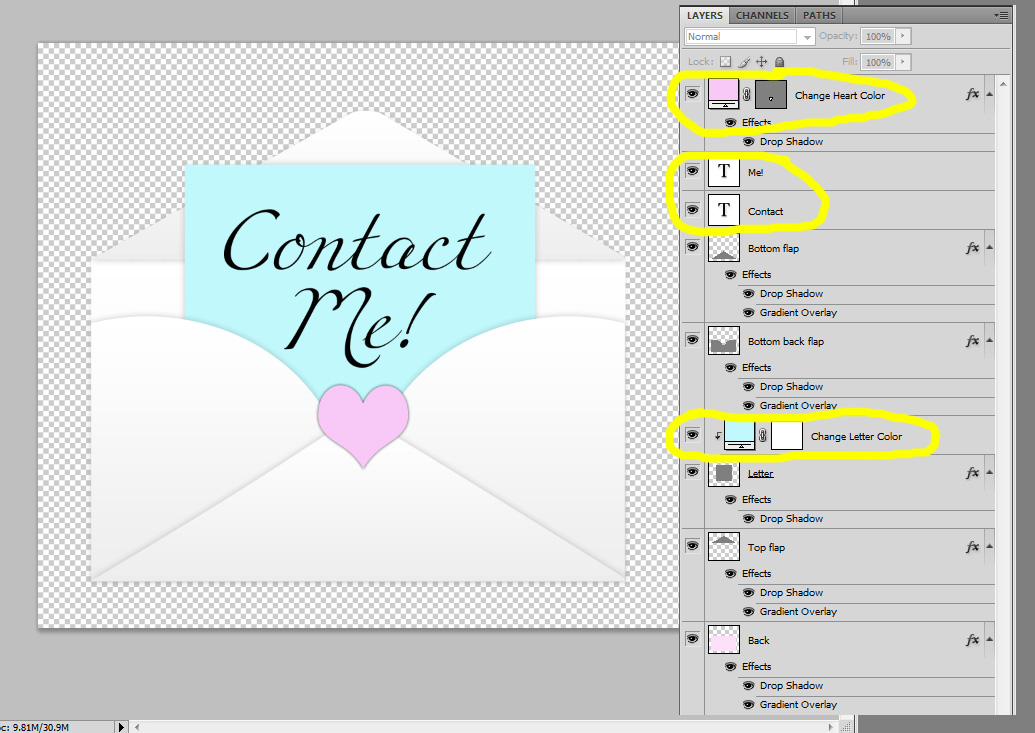
This is what the image will look like when you open it up in Photoshop or Photoshop Elements. It looks scary with all of those layers, but you only have to change the color of the heart and little letter, and adjust the text.
Simply click on the top pink Solid Color adjustment layer box to change the heart color and click on the blue Solid Color adjustment layer box to change the letter color. You can remove the heart by turning off the heart layer. :-) And you can customize the text (the text layers are circled in the image above).
Then "Merge Visible" if you are putting this on a background that is not white, or "Flatten" if the background is white. Then Image, Image Size and adjust the width of the envelope to taste. I made the one I posted above 150px wide. Make sure to adjust the image size, the original envelope is HUGE!
Upload the little envelope to an image sharing site.
Paste the code you see below (put your email address where it says "youremailaddress" and the Direct Link you copied in place of the TinyPic URL already there) in a post or on a HTML gadget in Page Elements in Blogger. Remove the center code if you don't want the image centered.
Download the incredibly cute CoffeeShop Envelope Icon file HERE!
Do you want to download all of my favorite CoffeeShop PSE/Photoshop Actions (including exclusive ones not found anywhere for free), Textures, Papers, Design Elements, and Lightroom Presets in one convenient zipped file AND help support this blog? Just click here for my CoffeeShop Mega Download Pack!

This is what the image will look like when you open it up in Photoshop or Photoshop Elements. It looks scary with all of those layers, but you only have to change the color of the heart and little letter, and adjust the text.
Simply click on the top pink Solid Color adjustment layer box to change the heart color and click on the blue Solid Color adjustment layer box to change the letter color. You can remove the heart by turning off the heart layer. :-) And you can customize the text (the text layers are circled in the image above).
Then "Merge Visible" if you are putting this on a background that is not white, or "Flatten" if the background is white. Then Image, Image Size and adjust the width of the envelope to taste. I made the one I posted above 150px wide. Make sure to adjust the image size, the original envelope is HUGE!
Upload the little envelope to an image sharing site.
Paste the code you see below (put your email address where it says "youremailaddress" and the Direct Link you copied in place of the TinyPic URL already there) in a post or on a HTML gadget in Page Elements in Blogger. Remove the center code if you don't want the image centered.
<center><a href="mailto:youremailaddress@yahoo.com">
<img src="http://i49.tinypic.com/npkyl4.jpg"> </a></center>
<img src="http://i49.tinypic.com/npkyl4.jpg"> </a></center>
Download the incredibly cute CoffeeShop Envelope Icon file HERE!
Do you want to download all of my favorite CoffeeShop PSE/Photoshop Actions (including exclusive ones not found anywhere for free), Textures, Papers, Design Elements, and Lightroom Presets in one convenient zipped file AND help support this blog? Just click here for my CoffeeShop Mega Download Pack!


